
How much is there?
Read pile-level volume and estimated tonnage with the calculation basis visible.
Stockpile intelligence
Turn physical stock into a stock statement your team can trace.
For thermal plants, steel operations and mines: drone capture, pile-level volumes, density-based tonnage and period-to-period review, connected through Flybi V7.
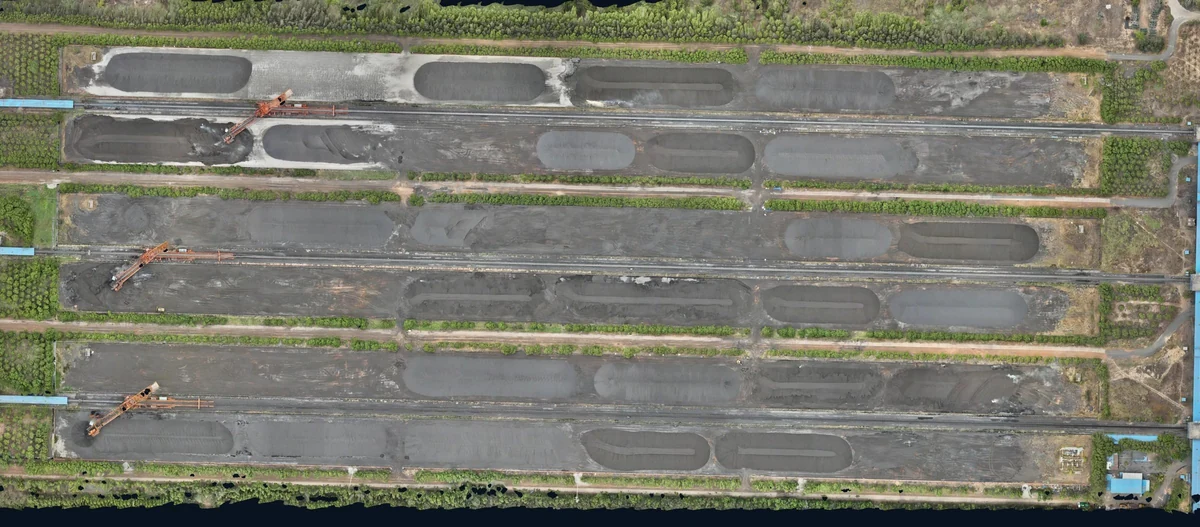
A closer look / Motion overview
A quiet aerial perspective, AI-animated from an enhanced Flybi project photograph.
A slow aerial push follows a long stockpile, with parallel conveyors to the left and a planted access road to the right.
This silent clip is AI-animated from an enhanced Flybi project photograph; it illustrates the setting and is not a measured surface or recorded flight.
Read pile-level volume and estimated tonnage with the calculation basis visible.
Locate the material, pile boundary and measurement record in the yard.
Compare compatible visits and reconcile the difference with your site records.
Inside stockpile intelligence
Follow the transformation from a physical stockpile to a quantity with a clear, reviewable basis.
01 / Capture
Overlapping field images or laser observations build the surface. Coverage and a reliable position reference come first.
Geometry from field capture02 / Boundary
Separate the material from roads, equipment and neighbouring piles. Review the toe before calculating the volume.
A reviewed pile perimeter03 / Volume
Lift the surface to see the relationship: volume is the space between the reconstructed pile and its agreed reference base.
Surface minus reference base04 / Material
Density and moisture come from suitable material testing or documented inputs. Change the examples to see their influence.
Independent material inputs05 / Inventory
Connect geometry, material inputs and the calculation in one reviewable record. Keep the original measurements and assumptions together.
A traceable inventory decisionChange the teaching inputs. Neither is measured by the photograph.
Volume × as-received density; then remove the wet-basis water fraction.
Geometry supplies volume.
Material testing supplies the missing context.
Explore the five steps, or play the complete story.
Concept visualisation with illustrative geometry and values. Density and moisture require independent, documented inputs. Actual project views are shown separately in V7.
This teaching example uses 24,800 m³ and as-received bulk density in tonnes per cubic metre. As-received mass = volume × density. Dry-solids mass = as-received mass × (1 − wet-basis moisture fraction). Outputs are rounded to whole tonnes. A dry-basis density or dry-basis moisture value requires a different calculation basis. Actual materials may vary across a pile.
The reconstructed surface and reference base must share an appropriate position and height reference. The visible front toe is traced for this illustration; the far-side footprint is an explanatory assumption. Occluded boundaries, base assumptions and data quality affect the result. The raised photographic cutout explains the relationship and is not a measured 3D model.
Your yard, inside V7
Move from the yard view to inventory and reporting without losing the selected capture. The V7 product tour shows how that context stays visible.
See material categories and labelled piles against the actual yard layout.
Review the selected visit, pile quantities and the density basis used for estimated tonnage.
Define the material-wise or location-wise breakdown and PDF, Excel or CSV handover your team needs.
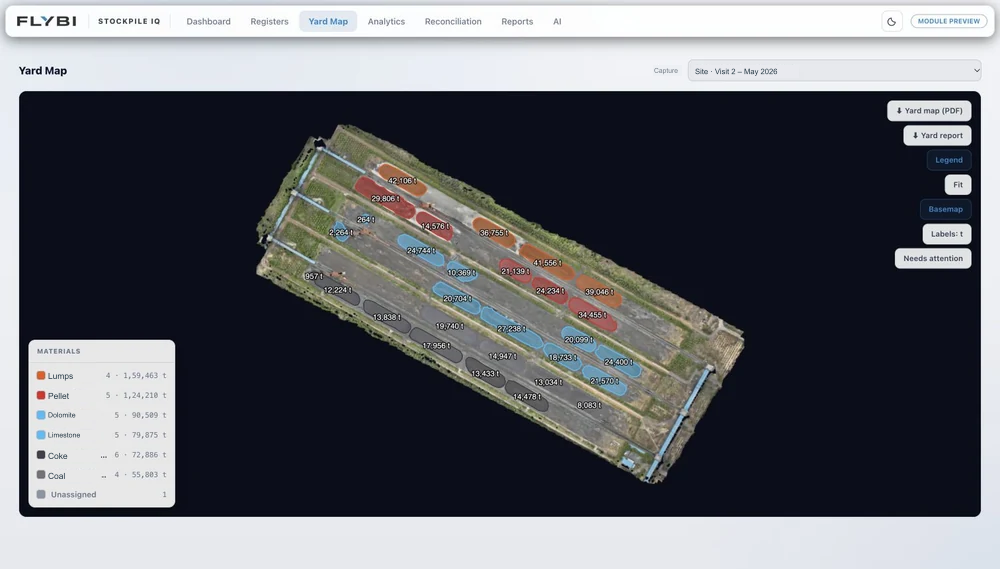
One place to return to.
Operations and finance can start from the same selected visit and pile record.
From site to review
Set a repeatable capture and reporting cycle around inventory close. Keep the yard definitions and calculation method consistent between visits.
Identify piles, materials, ground control and the reference base. Plan around stock movement and record the source and date of density values.
Capture the yard, process the surface, check control and calculate each pile’s volume. Convert to estimated tonnes using the documented material basis.
Deliver pile-level records, a stock statement and the agreed surface archive. Review period changes alongside weighbridge or other available site records.
Before the first capture
Field capture measures geometry. Estimated tonnage is calculated from volume and an applicable material density. Density, moisture and the chosen base can affect the result, so the calculation basis should accompany it.
Yes, when the measurements use compatible pile definitions, reference surfaces and measurement assumptions. Define the comparison before capture so that changes can be interpreted meaningfully.
A site location, approximate yard area, material types, access constraints and your preferred capture timing. If you have prior measurements, a pile register or density information, it helps establish the basis.
A typical scope includes pile-level volume records, density-based tonnage, a stock statement and the supporting site or surface output. Agree report formats, quality records and comparison periods with the project team. Density and moisture inputs must have a documented basis.
Prepare for the measurement programme
Bring the people who use the result into the scope: site operations, field specialists, stores and finance may each need a different view of the same inventory.
Share the yard layout, access constraints, material categories, approximate pile count and the periods you want to compare. Identify moving equipment and any stock that will change during capture.
Agree ground control, pile boundaries and the original ground or reference-base method. Record the source and date of density values used for tonnage estimates.
Define the breakdown by pile, material and yard, plus the review and sign-off process. Comparisons should use compatible methods, dates and material assumptions.
Start with your yard
Tell us the yard, materials, current stock-verification process and next reporting date.