
Keep the basis close
A useful handover identifies the capture date, pile boundaries, reference base and the source of density values used for estimated tonnage.
Flybi V7 / Reporting guide
See how the V7 reporting workspace brings the selected visit, report breakdown and output format into one view. This is an authentic interface capture, with its module-preview status preserved.
V7 / Stockpile IQ
The screen below shows the reporting controls and a statement preview together. Start with the selected visit, then review the report breakdown and format.
It is a captured product view—not a live workspace or a downloadable client statement. Visible quantities and status labels remain exactly as captured.
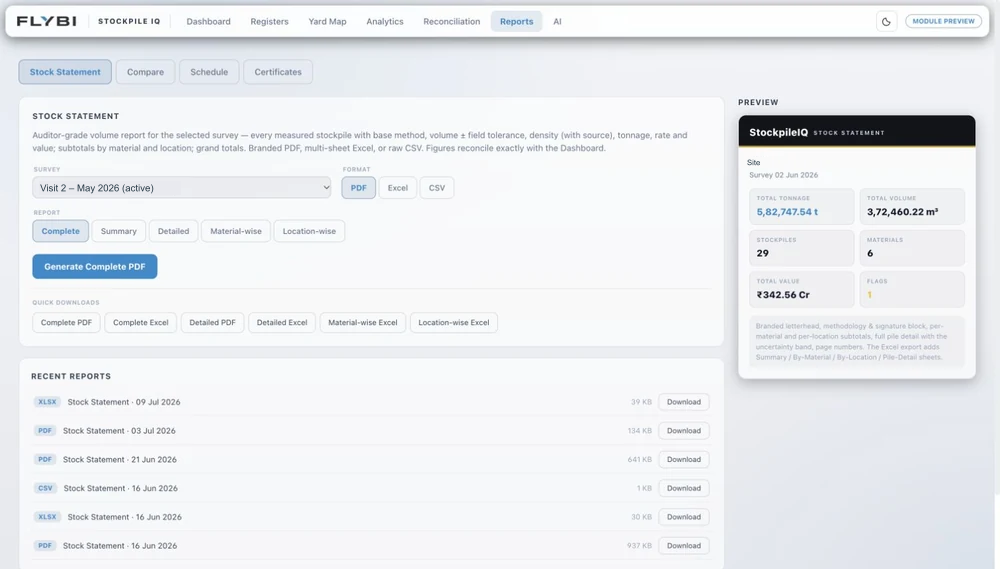
| Visible control or field | What to review |
|---|---|
| Selected visit | Confirm the site and capture period before reading the statement or comparing it with another visit. |
| Report breakdown | The captured menu offers Complete, Summary, Detailed, Material-wise and Location-wise views. Agree the breakdown your operations or finance team needs. |
| Output format | PDF, Excel and CSV appear in the captured format controls. Discuss the output and review requirements for your project. |
| Statement preview | Read the material rows and quantities alongside the visit, measurement basis and assumptions. A screenshot alone does not establish that a statement is approved. |
| Recent reports | Filenames, dates and formats help distinguish earlier outputs. Confirm which version belongs in the current review. |
A useful handover identifies the capture date, pile boundaries, reference base and the source of density values used for estimated tonnage.
Changed boundaries, moving stock or different density assumptions can affect the result. Resolve those differences before interpreting a variance.
Agree who reviews the statement, what supporting records they need and how the accepted version reaches the people using it.
The next step
Bring the breakdown and review process you work with.